QLabel
1 显示GIF动画
#include <QApplication>
#include <QImage>
#include <Magick++.h>

int main(int argc, char *argv[]) {
    QApplication a(argc, argv);

    // 初始化Magick++
    Magick::InitializeMagick(*argv);

    // 创建QImage序列(这里简化为红色和绿色两帧)
    QImage image1(100, 100, QImage::Format_RGB32);
    image1.fill(Qt::red);

    QImage image2(100, 100, QImage::Format_RGB32);
    image2.fill(Qt::green);

    // 将QImage序列保存为GIF文件
    Magick::InitializeMagick(*argv);
    Magick::ImageList imageList;
    imageList.push_back(Magick::Image(image1.width(), image1.height(), "RGB", Magick::CharPixel, image1.bits()));
    imageList.push_back(Magick::Image(image2.width(), image2.height(), "RGB", Magick::CharPixel, image2.bits()));
    imageList.write("path/to/your/animation.gif");

    return a.exec();
}
2 超链接
很多软件右下角都有一个超链接连接到网站,qt实现这个非常方便。只需要qlabel settext就可以了
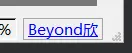
遵从html的语言格式